
Best fit
Who should use this template
Designed for mid–senior professionals, with a strong fit for these fields and career stages.
EngineeringBusinessManagementTechProfessionalSenior
Resume/CV template guide
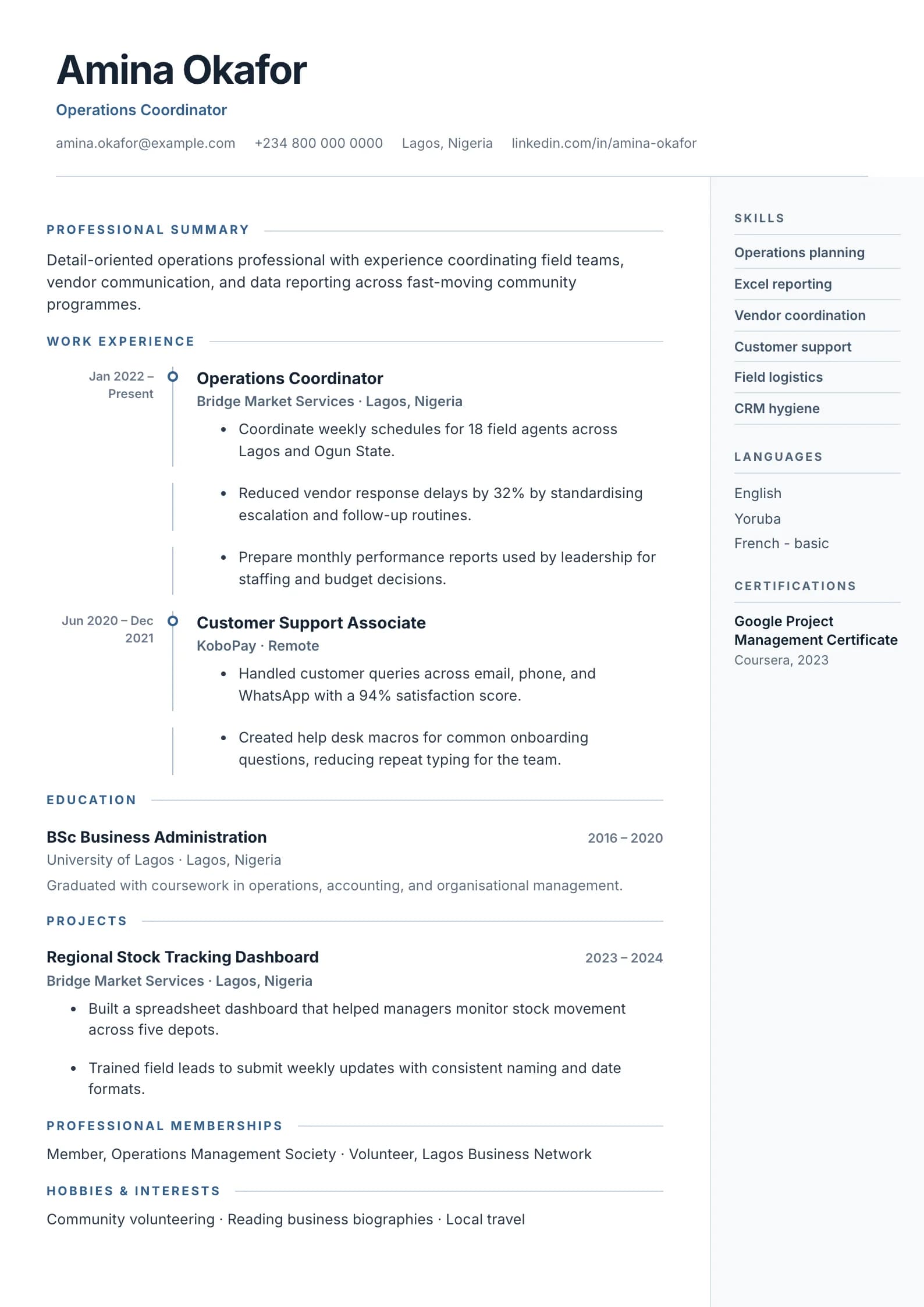
A vertical blue timeline with dot markers traces your career journey — ideal for experienced professionals.
Timeline turns career progression into the primary visual story. It is useful when promotions, expanding responsibility, long projects, or movement across organizations demonstrate readiness for the next role.
Format strengths
Use this structure when its hierarchy supports the evidence you need a recruiter to notice first.
Best fit
Designed for mid–senior professionals, with a strong fit for these fields and career stages.
Use it carefully
Detailed template analysis
Timeline makes movement through roles, projects, or career stages visually explicit. It is useful when promotions, increasing scope, contract phases, or a coherent sequence of assignments forms the strongest argument. Each point on the line should represent a meaningful stage with a date, context, and result. If the history contains many brief unrelated jobs, the visual sequence may emphasize fragmentation rather than progression.
Write entries so the reader can understand what changed from one stage to the next. Show larger teams, more complex projects, expanded territory, new technical responsibility, or improved outcomes. Avoid repeating the same duty under every point. Projects can be included when they clarify a transition or demonstrate current capability, but the distinction between employment and independent work should remain clear.
The vertical line and markers should help navigation, not force an entire role onto the next page. Long entries need to break naturally while retaining clear dates and titles. Inspect the generated PDF for isolated markers, disconnected line segments, or headings left at the bottom. If the content is exceptionally dense, a conventional single-column chronology may produce a calmer result.
ATS compatibility depends on the underlying text order, not the decorative line. Copy the PDF into a plain editor and confirm that roles and dates remain in sequence. Keep contact information and section headings as text, and avoid using timeline position as the only way to communicate dates. Timeline is successful when the visual story reinforces an already clear career progression.
Content priorities
The visual format earns attention only when the most relevant evidence appears in the right sections.
Show promotions, expanded scope, changed responsibilities, and reasons the progression matters.
Attach dates to launches, transformations, projects, and operational improvements.
Keep skills and credentials aligned with the role you want now, not only earlier positions.
How to use it
Keep the structure useful, replace every example, then test the final file as a recruiter would see it.
Keep the sections that support your target role and remove irrelevant placeholders.
Replace sample text with accurate tools, scope, achievements, education, and links.
Check hierarchy, dates, spelling, and page length before exporting PDF or DOCX.
Template FAQ
It can make gaps more visible. Use accurate dates and briefly explain relevant study, caregiving, freelance, or transition periods when they help the employer understand your history.
Focus on the most relevant 10 to 15 years. Earlier experience can be summarized if it supports your current level without overcrowding the page.
Use the layout as a starting point, then make every section specific to your next application.
Open the editor